The Order Summary page is the self-serve hub your customers use after buying with Ship Later. Once a shopper reserves items, this page is where they see what they have held, decide when to ship, and pay for delivery. Keeping them here means fewer support emails about "where is my order?"
What the page shows
- Every held order, with the order number, total, date, and a status badge (for example, "Shipping Pending" or "Dispatching").
- Which items are ready to ship now and which are still waiting (if your store uses per-item readiness).
- A running shipping fee preview as the customer changes their selection.
- Tracking links once an order has shipped, or a "Tracking pending" note if the carrier hasn't registered it yet.
What customers can do
- Select which held orders to include in their next delivery.
- Preview the shipping cost for that combination before committing.
- Proceed to a short checkout to pay shipping and release those orders for fulfillment.
- Filter and search their order history by status or date range.
- View a link to each individual Shopify order.
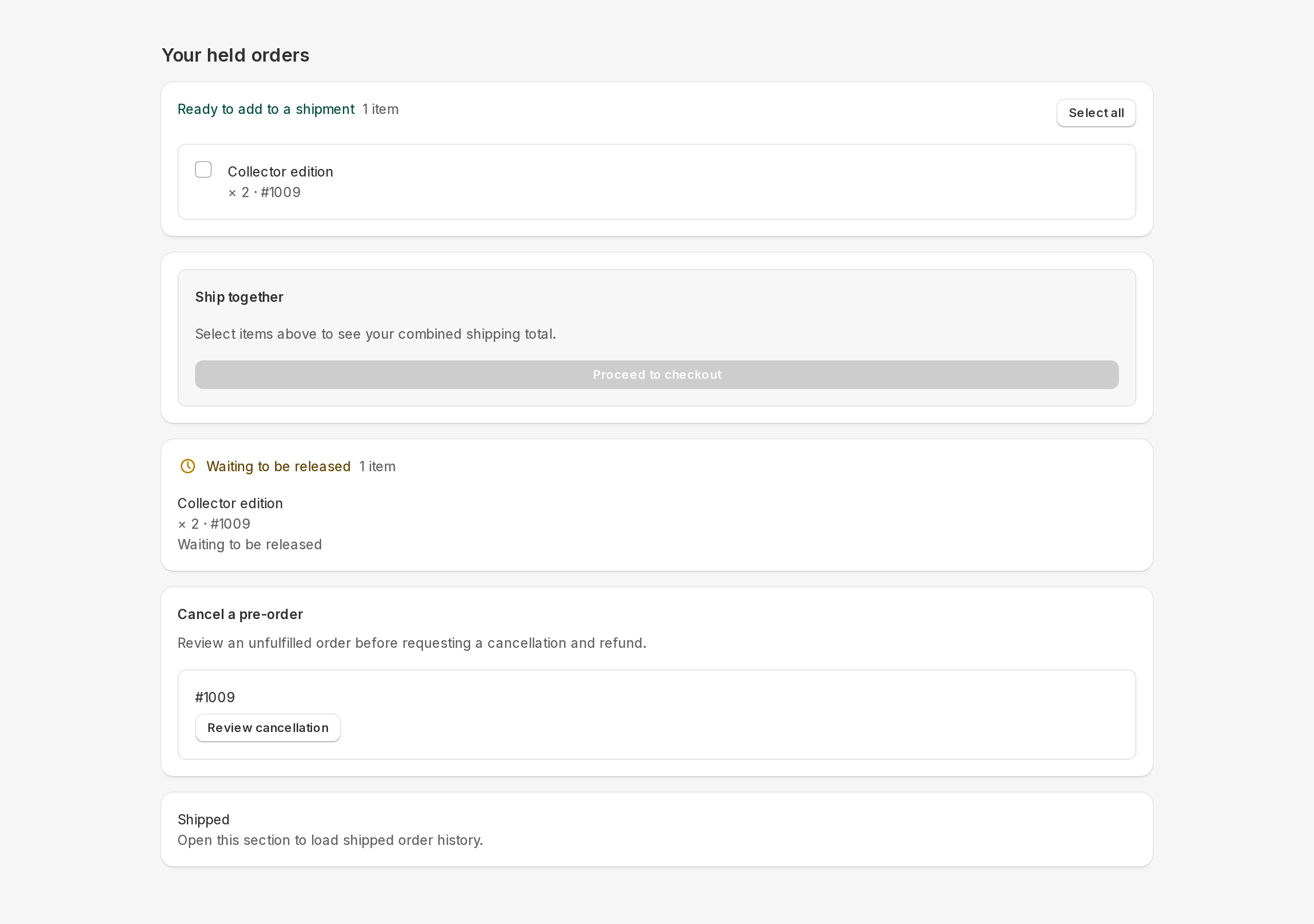
How item status appears
Order labels are configurable. Shipping Pending means held; Dispatching means preparation started, not that a parcel left. Billing Order identifies a payment/combined record, not payment progress or packing authority. Item readiness and order roles are separate; see The order lifecycle.
Signing in
Customers must be signed in to see their orders. The account they sign in with must use the same email address they used at checkout. If a customer says they cannot see their orders, this is almost always the cause. See A customer cannot see their reserved orders for a quick checklist.
Identify the physical parcel record before packing. Legacy combined mode uses the combined order; split payment/shipment mode uses a separate shipment order and a payment copy. Never pack the payment copy. A documented warehouse workflow may instead ship released originals; use only that agreed procedure.
The final delivery total can include an eligible Shopify shipping rate plus Addora fee lines, less applicable discounts and available shipping credit. A zero Addora base fee does not guarantee free delivery. The estimate can be unavailable when address, currency or rate information is missing; checkout confirms the final amount.
Customer preorder cancellation
On the customer-account Held Orders page, an eligible native preorder can offer cancellation. Open the review to see the exact refundable amount and any retained cancellation fee before confirming. Processing is asynchronous: wait for the result instead of submitting again. Unsupported or already released cases offer a support request rather than guaranteed self-service cancellation.
STILL A QUESTION?
Let's work through it together.
Every store is a little different. We're here to help.