Links marked “in Addora” open the matching screen in your Shopify admin. Sign in and choose your store if Shopify asks.
Open Packing slip settings in Addora ↗Start safely
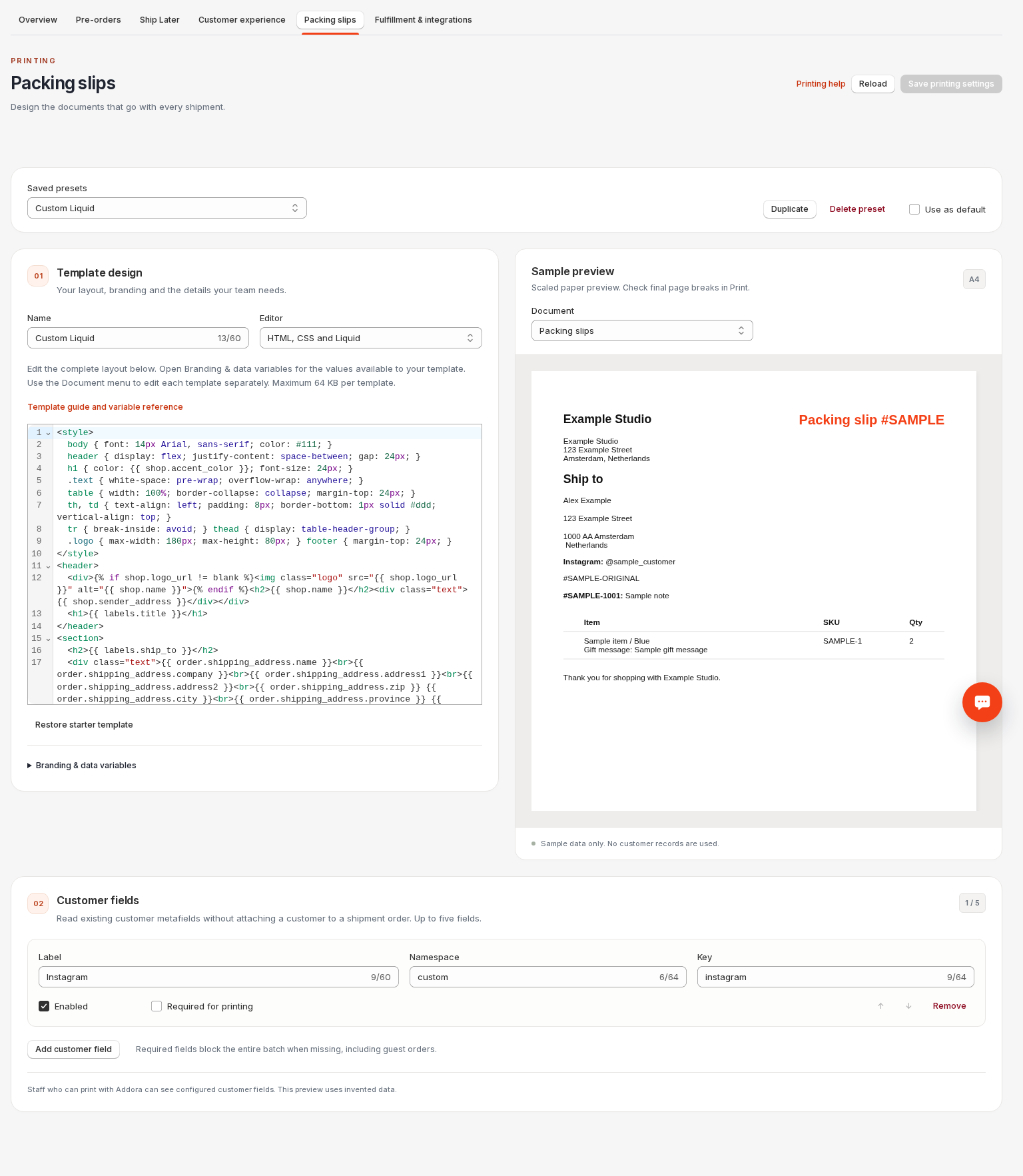
Open Packing slip settings (in Addora ↗), create or duplicate a preset and select HTML, CSS and Liquid under Editor. The starter source is editable in full, with line numbers, syntax highlighting, undo and search. Classic remains available.
Use Document to switch between Packing slips and Picking list. Each has independent source. Edit HTML and CSS, use Liquid loops, conditions, assign, capture and standard filters. The sample uses invented data. Save before printing, then select this preset in Addora’s Shopify Print action. Unsaved source never changes saved documents.
Restore starter template replaces only the selected document’s source after confirmation. Duplicate the preset before experimenting, or switch back to Visual controls to use the structured layout while keeping your source. Reload discards unsaved edits. Both templates are validated at save; an error keeps the previous saved version. The preview labels its last valid sample when an edit fails.
Variables and examples
Use {{ order.name }}, {{ shop.name }}, {{ shop.sender_address | newline_to_br }} and {{ shop.footer }}. shop.logo_url is the saved inline logo; shop.accent_color, shop.layout and shop.columns reflect the preset. labels.title, labels.item, labels.sku and labels.quantity provide translated headings. document.type, document.group_by, document.paper and document.locale describe this print request.
Loop with {% for item in line_items %}{{ item.title }}: {{ item.remaining_quantity }}{% endfor %}. Rows have title, variant_title, sku, image_url, properties, allocations and location.name. quantity is an alias of remaining_quantity: only eligible physical units still ready to fulfill, never the original ordered quantity. Shopify IDs, internal properties, payment-only lines, held units and fulfilled units are unavailable.
shipping_address (also order.shipping_address) has name, company, address1, address2, city, province, zip and country. customer_fields contains enabled, resolved fields with label, value, namespace, key and type. Configure fields first: {{ customer.metafields.custom.instagram.value }} reads that configured value. Missing optional values are blank; required-field checks still block packing batches even if your layout omits the field. Customer email and the complete customer record are unavailable. Printing never attaches a customer.
item.properties includes only selected public properties. Loop with {% for property in item.properties %}{{ property[0] }}: {{ property[1] }}{% endfor %}. source_references and notes require their preset switches; notes contain order_name and text. Erased customer identity is never reconstructed. Picking lists receive no customer fields or notes; grouped rows contain allocations with order_name and quantity. Grouping and location filtering happen before the template runs.
Formatting, limits and recovery
All data strings are HTML-escaped before rendering. Output, capture, assign, escape, escape_once and newline_to_br work together without double escaping. String comparisons, size and truncate operate on escaped text, so a value containing & is compared as &. Missing optional variables render blank; unsupported filters are errors. Raw does not recover unescaped customer data. Property keys are escaped too: use item.properties["Gift & note"] for a property named Gift & note.
You can edit style blocks, CSS grid/flex, @media print and @page, and use a full HTML/head/body document or a fragment. JavaScript, forms, SVG, remote fonts/styles, CSS resource URLs, include/render tags and external links are rejected. Images may use the saved PNG/JPEG logo or HTTPS Shopify CDN URLs. Order Printer templates require adaptation to these variables; money and Shopify theme filters are unsupported. Invoices, receipts and automatic printing are not included.
Each template is limited to 65,536 UTF-8 bytes, each rendered parcel to 2 MB and each batch to 20 MB, with a five-second render budget and loop/filter limits. Ranges are allowed only directly in for/tablerow loops, never as filter inputs. Save checks present and missing sample values; conditions that depend on real data can still fail later. Simplify a failing template, save, close and reopen Print. Real-document errors show a safe recovery page instead of partial slips. Staff warnings remain screen-only. (8 MB for a product-grouped picking document). Save also renders 75 long sample lines and projects their size and work to a 50-parcel batch. Preview renders only the selected document with a one-second budget.
Templates control what appears on paper. Keep item identity, remaining quantities and parcel allocations visible and verify a multi-page print or PDF before using a custom template to pack real orders. Branding/column switches provide variables; custom source decides whether to use them. Addora cannot validate that a custom layout is operationally complete.
The preview scales A4 or Letter paper to fit the screen and approximates the default margins. Use Print to verify final page breaks and print-specific CSS. Picking-list previews offer By order and By product; saving checks both. Save errors name the preset and document and open the failing source. Switching documents or presets starts a fresh Undo history for that editor; source text stays separate.
STILL A QUESTION?
Let's work through it together.
Every store is a little different. We're here to help.