Links marked “in Addora” open the matching screen in your Shopify admin. Sign in and choose your store if Shopify asks.
Open Settings, Ship Later in Addora ↗If you want to stop Ship Later from appearing at checkout without uninstalling the app, you can do that in a few clicks. Your settings, orders, and email configuration stay saved, and you can turn Ship Later back on at any time.
How to turn Ship Later off
- Go to Settings, Ship Later (in Addora ↗).
- Choose Turn off Ship Later.
- Addora removes its Ship Later rate from your shipping settings, so customers can no longer choose Ship Later at checkout.
Products that use Addora pre-order options keep their own pre-order delivery rate. To stop selling a product as a pre-order, open Settings, Pre-orders (in Addora ↗) and choose Remove pre-order for it.
What happens to existing orders
Turning Ship Later off at checkout does not affect orders that are already held in Addora. Those orders stay in their current state and can still be shipped by the customer through the Order Summary page. If you want to prevent that as well, contact support to discuss the right approach for your situation.
What stays saved
- Your settings, such as the shipping method name, email text, lifecycle labels, and tags, stay saved.
- Your held orders and their history are untouched.
- Reminder emails and other automations continue to run for orders that are already in Addora.
- Your plan stays active.
Turning Ship Later back on
Go back to Settings, Ship Later (in Addora ↗) and choose Turn on Ship Later. Addora adds its Ship Later rate back to the delivery profiles you selected before.
If you decide to uninstall
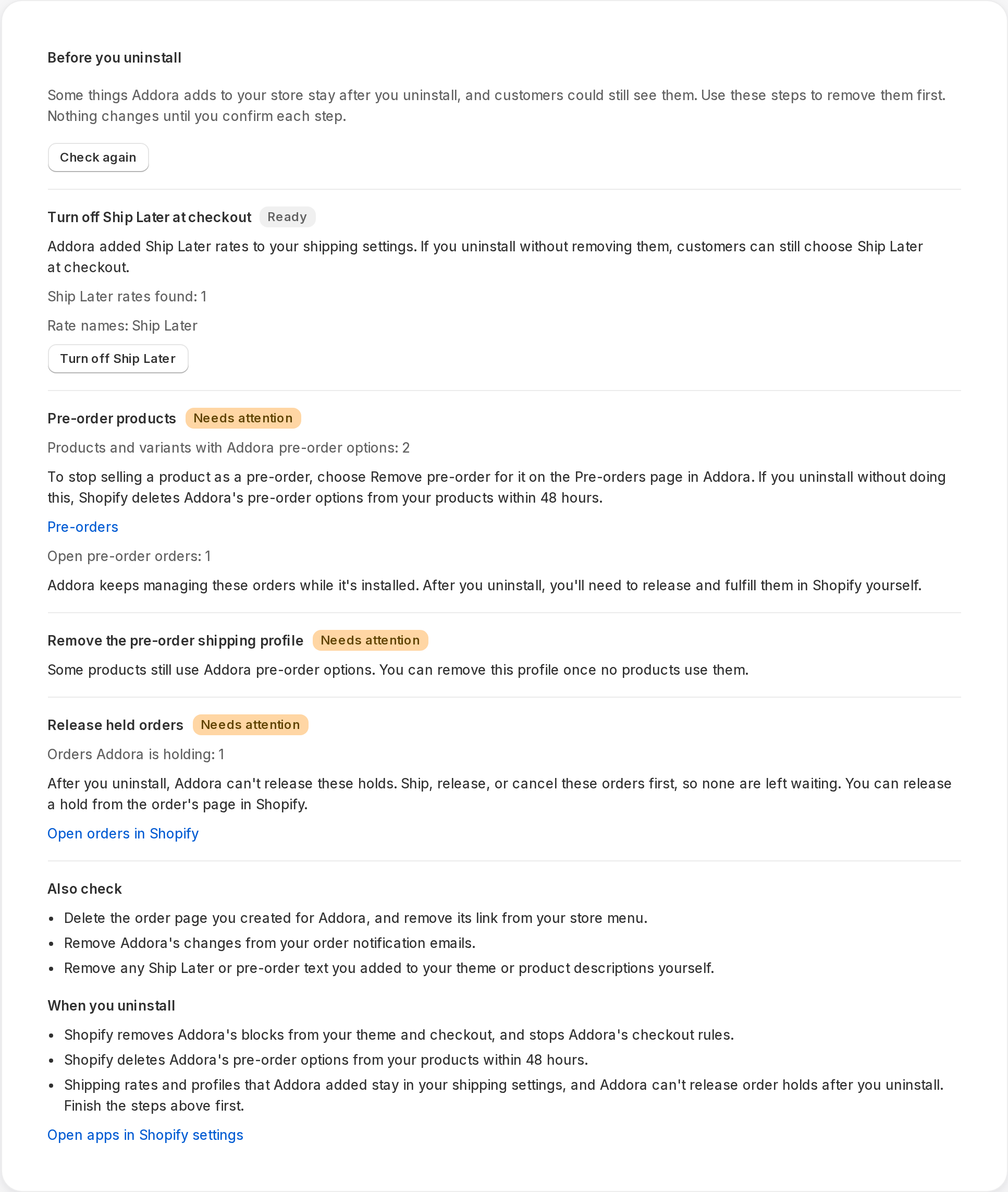
Some things Addora adds to your store can stay after you uninstall, such as its Ship Later shipping rates and the pre-order shipping profile. After you uninstall, Addora can't change them or release order holds. Before you uninstall, open Settings, Overview (in Addora ↗) and use Before you uninstall to remove them first.
- Shopify removes Addora's blocks from your theme and checkout, and stops Addora's checkout rules.
- Shopify deletes Addora's pre-order options from your products within 48 hours.
- After uninstall, Shopify normally sends a shop-redaction request after a delay of about 48 hours. That is the trigger for queued deletion, not a guaranteed purge deadline. Uninstalling does not undo every Shopify configuration or merchant-installed theme change. Use Before you uninstall while Addora still has access.
Check the cleanup preview
Open Ship Later coverage in Settings. Stores using market-driven shipping select eligible markets and complete the displayed coverage/approval checks; legacy stores select delivery profiles and zones. Saved coverage is not necessarily verified or active. Check the product, destination and selected setup path before testing checkout.
Before you uninstall lists the applicable rate/profile/market connections, native preorder options and remaining holds. Review and complete the relevant actions. Shopify extension blocks differ from code you pasted yourself: remove merchant-installed addora-information.liquid and its render calls from every affected theme/template manually. Keep a backup before editing theme code. Pausing Ship Later does not stop native preorder intake or cancel the app subscription.
STILL A QUESTION?
Let's work through it together.
Every store is a little different. We're here to help.