One of the most ordinary support requests in ecommerce is also one of the most annoying. A customer places an order, then almost immediately realizes they forgot something. Maybe it is a low-cost add-on. Maybe it is the main product they meant to buy in the first place. Either way, the message lands in your inbox: can you just add it to the order they placed five minutes ago?
Shopify’s answer is both simpler and more awkward than most merchants expect. Yes, Shopify does let merchants edit orders after checkout. You can add or remove products, change quantities, update shipping fees, apply discounts, and then either collect more money or refund the customer if the total changes. That part is real and built into the platform.
Where things get messy is that order editing is not the same thing as giving customers a clean post-purchase add-to-order flow. Once you get past the basic feature list, Shopify’s own documentation makes the limitations pretty clear. Shipping methods and shipping rates are not recalculated when you edit an order, local delivery orders cannot be edited, and you cannot change the delivery method afterward, such as switching an order from shipping to pickup. In other words, Shopify can help you change the order, but it does not rebuild checkout around the new reality of that order.
That distinction matters more than it sounds like it should. If all you want is the technical answer to whether an item can be added after checkout, then yes, often it can. But if what you really want is a reliable way to let customers keep building an order without creating shipping weirdness, extra admin work, or fulfillment mistakes, native order editing only gets you part of the way there.
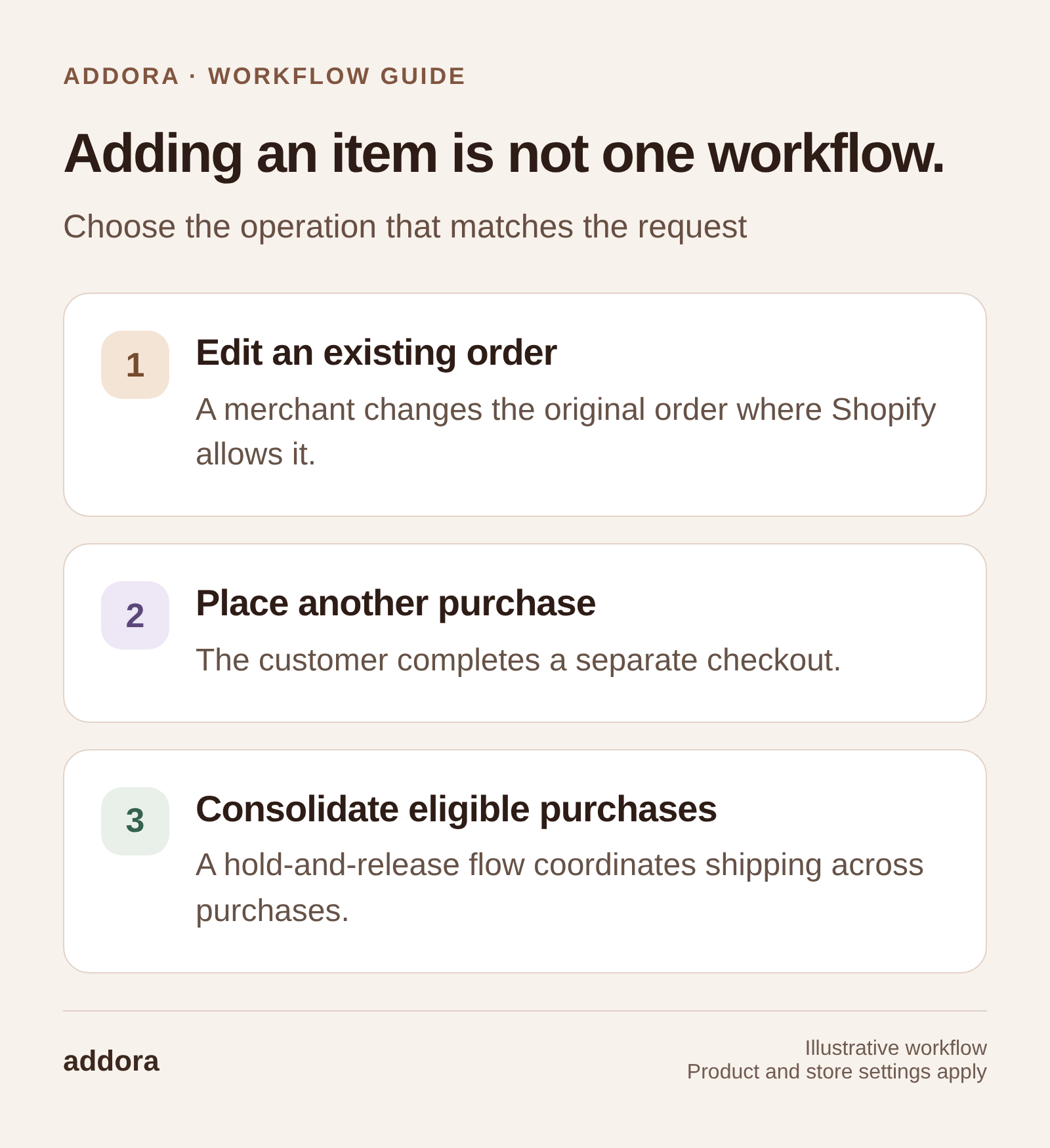
View this workflow at full size
What Shopify order editing actually does
Shopify’s native order editing tools are fairly capable on paper. From the admin, a merchant can open an order, click edit, add products, remove products, change quantities, add custom items, and adjust shipping fees. If the order total increases, Shopify lets you send an updated invoice so the customer can pay the difference. If the total decreases, you can issue a refund.
That is why a lot of merchants initially assume the problem is solved. If a customer forgot one item, you just edit the order. If they want a variant swapped, you edit the order. If support promised a free replacement, you edit the order. In all of those cases, the feature works more or less the way you would hope. Shopify is not missing basic order-editing functionality.
The problem is that post-purchase buying behavior is rarely only about line items. The moment an extra item affects packaging, fulfillment, or the economics of shipping, you are no longer dealing with a simple admin correction. You are dealing with a modified order that still carries the old checkout assumptions.
The part merchants usually find out too late
The most important limitation here is also the easiest one to miss: Shopify does not automatically recalculate shipping methods or shipping rates when an order is edited. If you add or swap products and the weight or dimensions increase, you may need to charge more for shipping yourself by adding a custom shipping charge.
That sounds manageable until you picture what it looks like in daily operations. If a customer adds a sticker, a single pack of sleeves, or something else tiny, you might just absorb the difference and move on. But if they add a heavier product, or something that changes how the order needs to be packed, you are suddenly making manual judgment calls that checkout would normally have handled for you. Shopify has not become wrong exactly, but it has stopped being automatic.
You can see the same frustration in community discussions. Merchants describe adding products after checkout and then having to manually work out the extra shipping because Shopify does not recalculate it for the new weight or order total. The workaround exists, but it feels like a workaround, which is usually a sign that you are leaning on a feature outside its sweet spot.
When native order editing is actually fine
None of this means order editing is bad. In fact, for occasional support fixes, it is often exactly the right tool. If the added item is small, the order has not gone far into fulfillment yet, and the shipping impact is negligible, editing the order is perfectly sensible. You make the change, send the updated invoice if needed, and carry on.
This is especially true for stores where these requests are infrequent. If only a handful of customers each month want to add something after checkout, there is no reason to turn that into a major systems problem. Shopify gives you a native way to handle those exceptions, and for many merchants that is enough.
The trouble starts when this stops being an exception and starts becoming a pattern. Once customers repeatedly want to add products after checkout, what felt like a convenient admin feature starts becoming a manual process your team has to keep rescuing.
Where it starts to break down
The real weakness in native order editing is not that it cannot change orders. It is that it was not designed to behave like a second checkout session. It lets merchants intervene after the fact, but it does not rerun the full customer-facing logic that made the original order coherent in the first place. That is why shipping becomes manual, and it is also why some edge cases get awkward quickly.
Shopify’s own limitations make that pretty obvious. Orders with local delivery as the delivery method cannot be edited, and delivery methods cannot be swapped after the order is placed. Shopify also notes that imported orders cannot be edited in admin, and that app-created orders generally can only be edited by the app that created them, with some exceptions such as draft orders converted into orders. Those are not fringe details. They are reminders that order editing sits inside a narrower operational box than merchants often assume.
There is also the issue of downstream systems. Shopify warns that some apps, especially fulfillment apps, might not recognize order edits correctly, which can create data mismatches after the order changes. That is exactly the sort of thing that turns a seemingly harmless “just add one item” request into an operations problem later in the day.
The more useful way to think about it
The cleanest mental model is this: native Shopify order editing is good for corrections, not accumulation.
If a customer made a small mistake and support needs to tidy it up, order editing is a good fit. If customers naturally want to keep buying after checkout, especially in stores where repeat orders and shipping timing matter, then you are not really solving a correction problem anymore. You are trying to support a different buying pattern. Shopify can help you patch that pattern manually, but it does not turn it into a smooth system on its own.
That is why so many merchants end up asking the wrong question. They start with “Can I add an item to an existing Shopify order?” when the more useful question is “How do I want post-purchase buying to work in my store?” If the answer is “occasionally, with staff help,” native editing is usually enough. If the answer is “customers do this all the time and I do not want shipping or support to become a mess,” then the real problem sits one layer higher than order editing.
If customers mainly want to buy again and ship purchases together, compare customer-driven order holds with combined shipping. Our customer accounts guide shows the return journey for held purchases; it is distinct from editing an existing Shopify order.
Final take
So yes, Shopify does let you add items to an order after checkout. That part is not the issue. The real issue is that Shopify does not recalculate shipping when you do it, does not let you treat every order type the same way, and does not turn post-purchase editing into a polished customer-facing flow. For occasional changes, that is usually fine. For repeated buying behavior, it starts to feel manual very quickly.
That is really the answer most merchants need. Shopify order editing is useful, and it is worth knowing about. But it is not the same thing as a proper “keep adding to your order after checkout” system, and the moment shipping starts depending on those edits, the limitations stop being theoretical.
If you are seeing this request constantly, it is usually a sign that customers do not just want order editing. They want more flexibility around when and how things ship. That is the kind of problem Addora is built around, so it may be worth a look if your store is starting to outgrow manual fixes.
Sources and further reading
Shopify Help Center: Editing orders
Shopify Help Center: Considerations for editing orders
Shopify Help Center: Editing products in an order
Shopify Help Center: Editing shipping fees in an order
Shopify Community: Recalculating shipping when editing an order
Shopify Community: Please allow to adjust shipping after an order is placed